Growth Systems
WordPress + GoHighLevel Growth System for US Businesses: The Practical 2026 Playbook
Most businesses do not have a traffic problem. They have a response-time problem, a message-clarity problem, and a follow-up consistency problem.
You can spend money on ads, SEO, referrals, and social content, but if your website does not direct users toward one clean next step and your CRM does not respond instantly, that demand leaks out of the system.
This guide explains how to build one connected growth engine with WordPress on the front end and GoHighLevel on the backend. It is the same structure we use for service brands that need predictable lead flow and reliable conversion operations.
If you are starting from scratch, read in order. If you already have a website but weak follow-up, jump to the automation chapters and then come back to conversion architecture.
You can also open these internal pages while reading for context: Services, Work, Industries, Process, and Contact.
Strategy before design
Every high-converting build begins with clear targeting. One audience, one primary offer, one primary CTA. Your website should not feel like a menu of unrelated ideas.
When visitors land on your homepage, they should answer three questions in under ten seconds: What do you do, who is it for, and what should I do next.
If any of these are unclear, the page may still look premium, but conversion will stay unstable. Design cannot fix positioning confusion.
Homepage structure that sells
Keep the navigation simple. Use clear labels for services, proof, process, and contact. Add a primary action in the first viewport and repeat it across the page.
The hero section should contain a direct value statement, a short support line, and one action path. Avoid vague slogans unless they are paired with a precise sub-headline.
A stat bar under the fold builds fast trust when done correctly. Use proof-oriented metrics only: years building systems, delivery consistency, platform outcomes, or response standards.
Service page architecture
Each service page should follow the same decision pattern: problem, what is delivered, how delivery works, expected outcomes, and common objections.
Do not hide core details. Buyers are not only comparing price. They are comparing certainty. The more clearly they understand scope and process, the lower your sales friction.
Every service page should include one direct CTA and one softer CTA. For example: Book a call or send requirements. This captures both high-intent and lower-intent leads.
Trust stack
Most websites add testimonials at the end. Strong websites distribute proof through the entire page.
Use micro-proof near claims: short client outcomes, implementation snapshots, platform badges, and specific project context. This keeps credibility tied to the promise being made.
If you have case studies, convert them into scannable cards with business type, stack used, and measurable impact. You can showcase them in Work and link from related service pages.
Form design and lead capture
Your form should ask for only what is needed to start qualification. Name, business, contact, service interest, and one goal field are enough for most projects.
Long forms reduce completion rate unless your offer has strong demand and trust. Keep first-step friction low, then qualify deeper during follow-up.
A common mistake is using forms that disappear into inboxes. The visitor submits, but nothing happens quickly. This is where GoHighLevel closes the gap.
Instant follow-up with GoHighLevel
Build an immediate acknowledgment flow that triggers within seconds after submission.
The first message should confirm receipt, set expectations, and offer one next step. Keep tone human and concise. Avoid over-automated language.
Then route the lead by service type. Website leads, automation leads, and support leads should not enter the same generic sequence.
Add appointment confirmation, reminder, and no-show recovery paths. Most teams lose more deals in scheduling chaos than in top-of-funnel demand.
Missed-call recovery
If your team receives inbound calls, missed-call text-back is one of the highest ROI automations you can deploy.
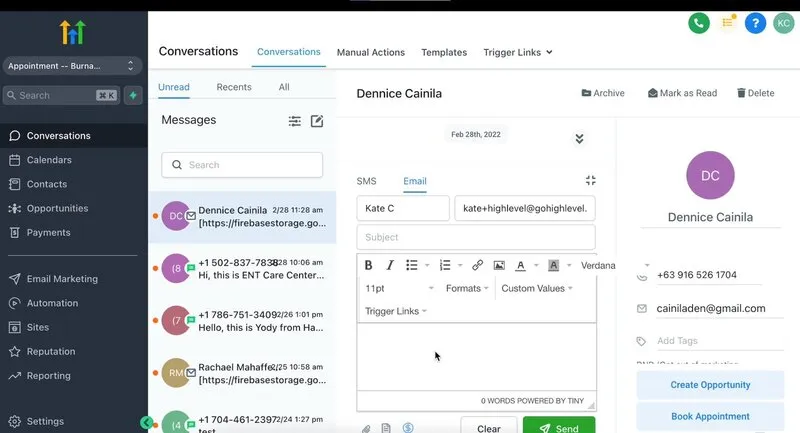
When a call is not answered, trigger an SMS within 20 to 40 seconds with a direct booking option. This recovers opportunities that would otherwise move to competitors.
Keep compliance in mind for SMS policies and sender setup. Build clean opt-in language on forms and ensure message frequency is clear.
Pipeline visibility
Automation is not only about sending messages. It is about making pipeline movement visible.
Define stages that match your real sales process: new lead, contacted, qualified, proposal, closed won, closed lost. Avoid vanity stages no one uses.
Assign clear ownership. Every stage should have one responsible role and one target action. This prevents pipeline stagnation.
Content and SEO alignment
Search traffic converts best when page intent and query intent match.
Build landing pages around service + audience combinations, not broad generic topics. For example, website systems for clinics, CRM automations for local services, or integrated website + GHL stacks.
Strengthen internal linking. Link service pages to case studies, process pages, and conversion-focused blog content. Good internal architecture improves crawl clarity and user flow.
GEO and AI visibility
Traditional SEO still matters, but answer completeness and structure now influence AI-driven discovery too.
Use clear section headings, direct answers, schema markup, and credibility signals across core pages. If your page is easier to parse, it is easier to surface.
This is why we treat schema as a baseline layer, not an optional add-on. Homepage, service pages, location pages, and article pages should each carry useful structured data.
Conversion math that actually matters
You do not need dozens of dashboards. Start with four numbers: lead response time, booked call rate, show-up rate, and close rate.
If response time improves but booked calls do not, your message may be weak. If booked calls rise but show-up drops, reminders or confirmation copy needs work.
System improvement is easier when each step has one owner and one metric.
Common implementation mistakes
Mistake one is over-designing before messaging is clear. Mistake two is adding too many CTAs with no priority. Mistake three is building automations no one on the team can maintain.
Mistake four is launching without end-to-end testing. Submit the form, receive messages, book the appointment, move the stage, and verify notifications. Test every path before going live.
Mistake five is ignoring mobile behavior. Most first touches are mobile. If pages load slowly or forms are painful, conversion drops immediately.
30-day rollout plan
Week 1: positioning, page architecture, and offer clarity. Week 2: homepage + service page build and proof stack integration.
Week 3: CRM pipeline, core automations, reminders, and recovery sequences. Week 4: QA, analytics, schema validation, and sales team handoff.
This pace keeps momentum high and avoids endless revisions that never reach launch quality.
What to do next
If your current website generates traffic but weak conversions, start by fixing message clarity and CTA flow.
If your team is losing leads after form fills or missed calls, prioritize GoHighLevel response systems immediately.
If both layers are weak, implement one connected build so your website and automation stack work as a single revenue system.
For implementation support, review Services, explore project outcomes in Work, and send your current setup through Contact. We can map the exact bottlenecks and suggest the highest-leverage first build.
Frequently Asked Questions
What is marketing automation in simple terms?
It is a connected set of systems that captures leads, replies fast, sends follow-up messages, and helps your team move prospects toward a booked call or sale without manual chasing every time.
How does automation help small businesses?
It reduces response delays, keeps follow-up consistent, improves booking rates, and gives business owners clearer visibility into where leads are getting stuck.
Is GoHighLevel suitable for all businesses?
It works especially well for service businesses, clinics, agencies, and local brands that depend on lead capture, appointment booking, and repeat follow-up. The exact setup still needs to match the business model.
Do I need an expert to set it up?
Not always, but expert setup usually saves time and avoids broken workflows, weak messaging, and tracking gaps. The more tools and handoffs involved, the more valuable good implementation becomes.
What should I automate first?
Start with the places where revenue leaks most often: form responses, missed-call text back, appointment reminders, and pipeline stage movement after a lead comes in.